Free prompt · Use your photo
Ozil Goal AI Prompt
Copy the prompt below for a video tool that accepts a reference photo. Watch our full test, including what went wrong. Our own generator uses a prepared action video, so you do not need to paste a prompt here.
Copy the 15-second prompt
Attach a clear photo of the adult you want as the scorer. Use a video tool that accepts both a reference photo and text. In our test, the photo guided the scorer's look; it was not the first frame. This prompt is separate from our site's generator.
Use the adult in my uploaded photo as the only featured scorer. Keep their recognizable face, hairstyle, body proportions and visible clothing consistent throughout.

Create a fictional 15-second, vertical 9:16 football video in a floodlit stadium. Keep the scorer, ball and goal readable in the frame. Follow the action with one smooth sideline camera.

0-3s: A goalkeeper comes forward; the scorer lifts the ball beyond the challenge.
3-6s: The scorer regains control as the ball drops.
6-11s: Two defenders challenge in sequence and miss; the scorer stays with the ball.
11-15s: The scorer sends the ball into the open goal. Show it entering the net before the clip ends.

Use natural football movement and stadium ambience. Avoid sudden scene changes, disappearing players, duplicate balls, changing clothes, unreadable sponsor text, real club badges, captions and the likeness of any real footballer.
The text is free to copy. We tested it once with one photo in Wan 3.0. See the settings and result. Other tools and new renders may differ. The tool you choose determines any watermark or rendering cost.
The model invents the scene and action; results vary.
One 15-second preset; no prompt writing in the form.
02 · One real prompt test
What happened when we tested this Ozil Goal AI prompt?
On October 18, 2026, we tested the exact prompt above with the fictional adult portrait below. Wan 3.0 received the portrait as a reference image (reference_image_urls), not a first frame. The model created the stadium and action. We did not provide a performance video, defender photos or a stadium image. Watch the full 15-second MP4 to see what it did and where it fell short.
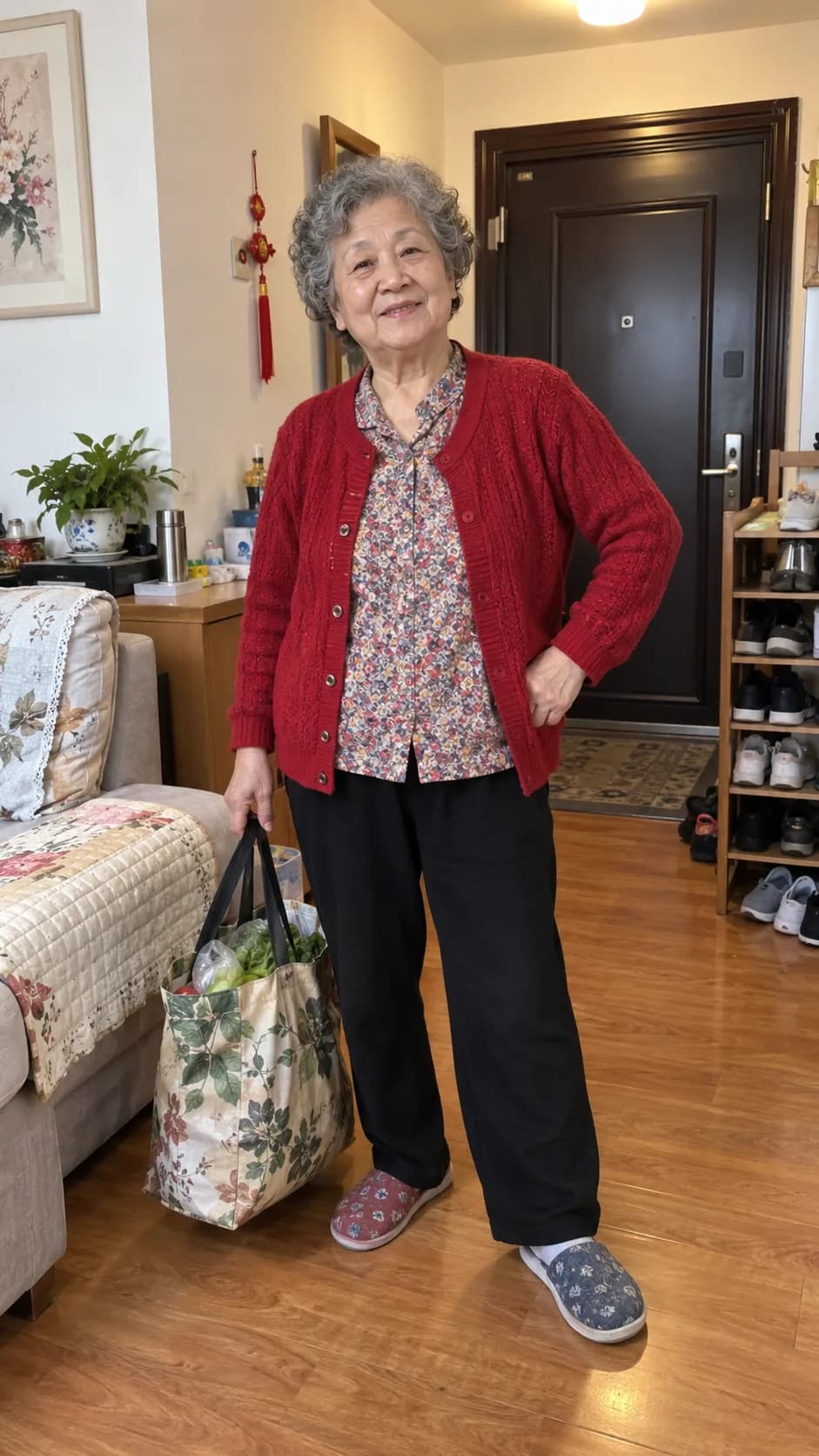
| Service and model | Kie AI · Wan 3.0 Video |
|---|---|
| Inputs | One portrait as an appearance reference plus the exact copyable prompt above; no video reference or first frame |
| Output requested | 15 seconds · vertical 9:16 · 480P · generated audio on |
| File received | 15.02-second MP4 · 480 × 854 pixels; web copy compressed for playback |
What we can see in the full video
- Shown: the scorer gets past a goalkeeper, continues toward goal and sends the ball into the net near the end.
- Not preserved: the source portrait’s red cardigan, patterned shirt and black trousers become a red football kit. Hair and general appearance remain recognizable, but this is not a clothing match.
- Action differs: other players appear during the run, but the two distinct missed defender challenges in the prompt are not clearly shown in sequence.
- Unwanted branding: readable sponsor text and club-like marks appear despite the prompt asking to avoid them.
This is one run on one model, not a measured success rate. The visible failures are part of the test result; a different generation may fail in other ways.
03 · A shorter experiment
Try the goalkeeper move in six seconds
If your tool cannot make a 15-second clip, start with one action: lift the ball over the goalkeeper and regain control. This is a different, shorter scene. It does not include the later defenders or the finish. Attach the same kind of clear adult portrait, then choose six seconds and vertical 9:16 if your tool offers them.
Use the adult in my uploaded photo as the only featured scorer. Keep their recognizable face, hairstyle and visible clothing consistent.

Create one continuous 6-second vertical 9:16 football shot in a fictional floodlit stadium. A goalkeeper rushes forward. The scorer lifts one clearly visible ball over the goalkeeper, runs past, and regains control as the ball drops. Follow both people and the ball with one smooth sideline camera. End with the scorer still controlling the ball; do not add defenders or a goal attempt.

Use natural movement and stadium ambience. Avoid cuts, duplicate balls, disappearing players, real club badges, captions and the likeness of any real footballer.
This shorter prompt also has no published test render. Check identity, ball continuity and the landing before attempting a longer sequence.
04 · Start with your photo
How do you use this prompt?
- 01
Choose an appearance-reference video mode
Use a tool that accepts a character or appearance reference alongside written instructions. Our test did not animate the portrait as an opening frame. A text-only mode receives no photo; a first-frame mode treats the photo differently.
- 02
Attach a clear, authorized photo
Use one adult subject with a visible face and outfit. Keep the reference photo attached as an input; the words “my uploaded photo” alone do not supply an image.
- 03
Paste the prompt and set the format
Choose vertical 9:16 and 15 seconds when available. If the tool only supports a shorter duration, use the six-second prompt above or split the sequence into separate clips.
- 04
Review the entire output
Check the scorer’s identity, the ball, each challenge and whether the shot reaches the goal. Each render may differ; another attempt can cost credits in the tool you choose.
The named model, length and input options depend on the third-party tool. We do not claim compatibility or a tested success rate for any particular app.
05 · What the inputs control
Why can two “Ozil goal” prompts produce different videos?
A reference photo can guide the scorer's look. The text describes the action. Without a video reference, the model must invent the timing, movement and camera path. More detail may help, but it cannot ensure the same result every time.
The name points back to Özil’s 2016 goal against Ludogorets. The prompts here describe a fictional scene; they do not ask a model to copy the original match broadcast. See the trend explainer for the match context and the difference between that goal and AI-made versions.
| Input | Appearance reference + text elsewhere | Preset on this site |
|---|---|---|
| Attacker | One photo attached by you | One required attacker photo; prepared into a character reference |
| Action and camera | Described in words; interpreted by the model | A prepared reference video guides the order and movement |
| Other people | Described in words | Up to four optional defender photos can guide assigned roles |
| Setting | Described in words | Night stadium by default; optional stadium image can guide it |
| Sound | Depends on the tool | New stadium ambience and a kick sound are requested; reference audio is not reused |
The preset is still AI generation. A reference clip guides the motion; it does not lock every frame. Faces, clothing, ball movement and the stadium can change. Read the making guide for the site's complete preset result and its recorded inputs.
06 · If your tool supports two references
What if you can upload a reference video too?
Some tools can use a video to guide action and camera movement, while a photo guides the lead scorer's look. Check that your tool supports both inputs together. Uploading a video alone does not mean it can replace the lead person. The prompt below is an example for tools that support this workflow; results can still vary.
Use the uploaded video as the action and camera reference, and the uploaded photo as the appearance reference for the lead scorer. Replace only that lead with the adult from the photo. Keep their face, hairstyle, body proportions and visible clothing consistent during turns and occlusion.

Follow the reference video's order of ball control, defensive challenges, camera movement and final shot. Keep other players in their own roles; do not duplicate the lead or turn the reference photo into a second player. Keep the ball visible and show it ending inside the goal. Generate new stadium ambience rather than copying sound from the reference. No captions or logos.
What the prepared clip contributes here
Our preset supplies a 15-second reference video for ball control, defensive challenges, camera movement and the finish. The form handles this input automatically, so you do not paste either prompt into this site. You can view the prepared action-reference MP4; it is an input, not a generated result or original match footage.
Publishing this MP4 here does not grant permission to upload it to another service. For an external test, use a performance video you are authorized to upload and confirm the tool supports appearance replacement guided by video.
07 · Judge the whole clip
What should you check before another attempt?
The face or outfit changes
Inspect the source photo and the entire output, especially turns and occlusion. The clear portrait in our one-photo test still became a different outfit, so photo quality alone does not explain every change. Another render may differ, but cannot guarantee a correction.
The move skips a challenge
Our one-photo test shows a finish but not two clearly separated missed defender challenges. Several actions compete for 15 seconds. Try the shorter move above or separate clips in a third-party tool. On this site, the prepared reference guides the sequence, but details can still vary.
Badges or sponsor text appear
Our test has readable branding even though the prompt asks for none. Check the whole video before publishing; a negative instruction is not a reliable brand filter. If unbranded imagery is required, do not use an output that fails that check.
A defender is the wrong subject
On this site, each optional photo maps to one assigned role. Check the slot label before submitting: First blocker, Orange defender, Purple defender, Chasing defender. Unselected players may still change.
The ball or finish is unclear
Watch the last seconds rather than relying on the poster frame. For a manual prompt, give the finish enough time. For a completed preset video, another paid generation is a separate attempt and may still vary.
08 · Direct answers
Ozil Goal AI prompt questions
What is an Ozil Goal AI prompt?
It is text that describes the scorer, football action and video format for an AI video tool. Attach a photo if you want it to use a particular person's appearance. The copyable version above asks for a 15-second goal scene.
Do I need a prompt to make a video on this site?
No. Upload your own eligible photo or an authorized adult attacker photo, optionally add defender and stadium images, then choose 480p for 12 credits or 720p for 22 credits. The preset supplies the action reference and instructions. See the step-by-step guide.
Is the copyable prompt the one used by this site?
No. The first prompt is for an appearance-reference photo and text workflow, and our test submitted the photo as a reference image. This site's pipeline also prepares character references and supplies an action video. The second prompt illustrates that input pattern, but it is not the exact internal request.
Can a prompt alone reproduce the same 15-second clip?
It can describe the action, but it cannot provide the exact performance and camera path of a video it has not seen. Our one-photo test shows a goal, but changes the clothing, includes branding and does not clearly show two separate defender challenges. Even with a reference video, details may change.
Can a prompt keep my face consistent?
A prompt can ask for a consistent face, but it cannot lock one in place. The reference photo, the complexity of turns and player crossings, and the video model all affect the result. Our published one-photo test asked for consistent appearance: the hair and general look stayed recognizable, yet the red cardigan and patterned shirt became a football kit. That single result does not establish frame-by-frame face consistency. Check the entire clip before using it.
Does copying the prompt make generation free?
Copying the text is free. A third-party tool may charge for rendering or retries. This site uses credits only when you submit a generation; choosing and previewing photos does not spend credits.
Do either of these workflows reuse match footage or sound?
No. The photo-prompt test supplied no match video or audio. The separate site preset uses a prepared fictional action reference and requests new stadium audio. Neither result contains the original match broadcast as an input.
About this page
What is verified here?
The form inputs, role mapping and generation steps described here match the current product workflow. We published one complete result made from the exact 15-second photo prompt and one photo. The separate preset result and its full input record are on the making guide. The shorter prompt and the adaptable video-reference prompt have no published test render. We have not measured repeatability or compared multiple third-party tools.
Only upload photos or videos you are authorized to use. The examples depict fictional AI-generated people and do not represent a real match or an endorsement by Mesut Özil, any club or broadcaster.
Want the prepared sequence?
Use your photo.
Skip the prompt.
Start with one authorized attacker photo. Add defender or stadium images only if you want to guide those parts of the scene. Review the example before submitting.
Open the Ozil Goal AI generator